


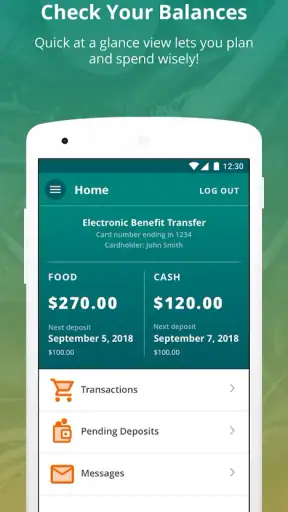
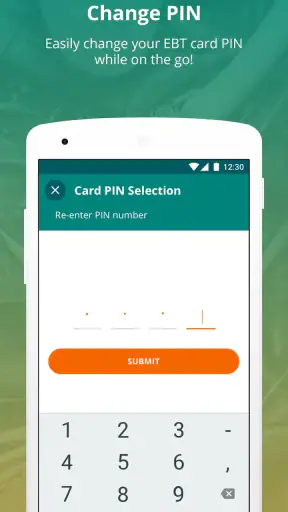
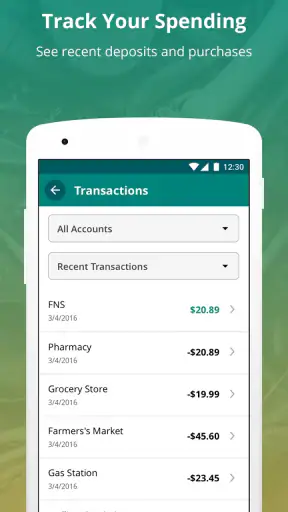
Managing SNAP and Cash benefits is one of those jobs that becomes stressful when the information you need is scattered across paperwork, phone calls, and point-of-sale receipts. I found that ConnectEBT is most useful when treated as a quick account-checking tool rather than a complete benefits-management service. It gives people a practical way to look at their EBT information from a phone, and that simple focus is also the reason its limits become noticeable.
My overall view is positive: if your state supports the app and you mainly want to check available benefits before shopping, it can save time and reduce guesswork. I would recommend it especially to people who regularly need to confirm a balance while away from home. I would be more cautious for anyone expecting a full case-management app, detailed budgeting tools, or a single solution for every question about eligibility and benefits.
What ConnectEBT does well in everyday use
ConnectEBT is a free finance app from Conduent Incorporated, built around access to SNAP and Cash account information. That purpose is clear from the first moment I used it: the experience is centered on getting to the account details that matter, not on surrounding them with unrelated financial products or general money advice.
That narrow focus is valuable. A regular banking app may show checking and savings balances, but it does not normally give an EBT cardholder the relevant benefit information. A state website may contain more administrative material, yet opening a browser, finding the correct page, and navigating a government portal can feel excessive when all I need to know is whether I have enough available benefits for a grocery trip. ConnectEBT sits between those two options by making the account check more convenient on a mobile device.
The app’s public reception also suggests that it has become a familiar option for many EBT users. It carries a 4.6 average from around nineteen thousand ratings, with more than a million installs. Those figures do not guarantee a smooth experience for every state or cardholder, but they do indicate that the app is not an obscure experiment. It has a substantial user base relying on it for this specific task.
In my experience, the strongest benefit is reduced uncertainty. Before leaving for a store, I can check the account instead of trying to remember the last transaction or estimating what remains. That matters particularly when a household is balancing several purchases and cannot easily absorb an unexpected shortage at checkout.
A realistic shopping routine
Imagine planning a grocery trip after several smaller purchases during the week. Rather than searching through receipts, I would open ConnectEBT, review the available SNAP or Cash information, and adjust the shopping list before heading out. If the planned total is close to the available amount, that quick check can help separate essentials from items that can wait.
The same routine is useful after shopping. Checking the account afterward can help confirm that the remaining balance looks sensible and make the next trip easier to plan. This is not a replacement for keeping receipts, but it gives me a second reference point. For people who share shopping responsibilities with another household member, checking before and after a trip can also prevent misunderstandings about what is still available.
A less obvious advantage is that the app can support planning between benefit deposits and shopping days. Instead of viewing the balance only at the register, I can use it as a prompt to think about the timing of upcoming purchases. The app does not turn the account into a full budget, but the information can still be useful when combined with a simple note on expected groceries and household expenses.
Where it compares favorably with the usual alternatives
The most common alternative is calling the number associated with an EBT card. Phone access remains important, especially for someone without a compatible smartphone or reliable mobile data, but it can be slower when the goal is only to confirm a balance. An app is easier to revisit during a shopping trip and avoids repeating the same automated prompts each time.
Another alternative is using a state benefits website. A website may be the better place for official notices, case information, application matters, or broader administrative tasks. ConnectEBT is more convenient for the narrow question of account access, but I would not treat it as a substitute for the state’s official channels when the issue concerns eligibility, a case change, or a formal dispute.
Paper receipts offer a useful transaction record, yet they become less helpful when several purchases have happened since the last receipt or when a receipt has been misplaced. The app’s balance view is more current as a reference, while receipts remain better for checking the details of a particular purchase. I see the two methods as complementary rather than competing.
Compared with a general personal-finance app, ConnectEBT has the right subject matter but a narrower purpose. Budgeting apps can combine bills, bank accounts, spending categories, and savings goals. That broader picture may be preferable for someone trying to manage an entire household budget. For someone who only needs SNAP and Cash account information, however, those extra layers can create more work than value.
Small habits that make the app more useful
I would make the account check part of a routine rather than waiting until the payment terminal. Checking before shopping gives me time to change the list, while checking after shopping helps catch an unexpected result sooner. This habit is particularly useful when several people use the same benefit account or when purchases are made at different stores.
I would also avoid treating the displayed balance as a complete spending plan. A balance tells me what is available, but it does not decide how much should be reserved for later meals, household priorities, or an upcoming benefit cycle. Writing down a rough shopping limit separately prevents the convenience of the app from turning into accidental overspending.
Another practical tip is to keep a backup route in mind. If the app is unavailable at the moment I need it, the card’s established phone support or the relevant state website may still be useful. That is not a criticism unique to ConnectEBT; it is simply sensible when access to benefit information affects an immediate purchase.
The friction I would want new users to understand
The app’s usefulness depends heavily on the relationship between the app, the EBT account, and the state or program it serves. A person should not assume that installing it automatically solves every benefits question. The app is strongest when the task is viewing account information. It is not the right tool for replacing every official service connected with a benefits case.
That distinction can be frustrating. Someone who has a missing deposit, a questionable transaction, a changed household circumstance, or a problem with card access may open the app expecting an explanation. Seeing account information can confirm that something is wrong, but confirmation is not the same as resolution. In those situations, the appropriate state or card-support channel remains important.
I also think the app’s narrow purpose may feel limited to users who want more financial organization. There is no reason to choose it as a general budgeting center when the main need is tracking bills, bank spending, savings, or debt. A separate finance tool will usually be more suitable for that broader job, provided the user is comfortable managing EBT information separately.
New users should pay attention to account setup and security in the same careful way they would with any app that displays financial information. I would use a strong, private sign-in method, avoid entering account details where someone else can see them, and keep the phone protected. Convenience is helpful, but it should not encourage casual handling of sensitive account access.
There is also a human factor that software cannot remove. If a balance looks different from what I expect, I still need to compare recent purchases, receipts, and any relevant official information. An app can make checking easier, but it cannot automatically explain every transaction or correct an account problem. The best experience comes from using it as one reliable checkpoint in a larger process.
Who will get the most value
ConnectEBT is a strong fit for SNAP or Cash benefit recipients who already use a smartphone and want a faster way to review account information. It is especially practical for people who shop frequently, share shopping duties, or prefer to check their available amount before committing to a basket of groceries.
It can also help caregivers and household organizers who need a quick view before planning purchases. The value is not in advanced financial analysis; it is in reducing the number of steps between the question “what do I have available?” and a useful answer. For many users, that convenience is enough to justify keeping the app installed.
The Everyone content rating makes it broadly approachable from an age-classification perspective. Still, I would not hand over account access casually to another person just because the app is easy to use. If a family member helps with shopping, it is worth agreeing on a clear and safe way to share information rather than leaving a signed-in account exposed on a shared device.
Who should choose another route
I would point someone toward the official state benefits website or phone support first if their main concern is an application, eligibility decision, case update, replacement card, or disputed transaction. ConnectEBT may be useful alongside that process, but it is not the place I would rely on for every administrative answer.
I would also suggest a broader finance app to a person whose main goal is a complete household budget. ConnectEBT can show relevant benefit information, but it should not be expected to organize rent, utilities, cash spending, bank accounts, and long-term goals in one view. Its focused design is a strength for account checking and a weakness for full financial planning.
Finally, someone who rarely uses mobile apps or has unreliable phone access may find the traditional phone or website route more dependable. The best option is the one that remains available when the information is needed, not necessarily the one with the most modern interface.
Version, availability, and long-term usefulness
The current release is version 2.4.0, identified with a June 2026 build marker, and it requires Android 10 or newer. That requirement is worth checking before planning around the app, particularly if the phone is older or cannot receive current operating-system updates. A compatible device is part of the practical equation, not a minor technical detail.
Because this is a finance app, keeping it updated is sensible when updates are available through the normal app store. Updates can affect compatibility and reliability, and an older installation may not behave the same way as the current release. I would still keep the alternative support route available rather than depending on any single mobile app for an urgent benefits question.
The free price is another clear advantage. There is no purchase decision standing between a user and the basic reason to install it, which makes trying it relatively straightforward. The more important question is not cost but fit: does the app connect to the account information the user needs, and is checking that information the main task?
Its release history reaches back to April 2017, giving it a longer presence than a newly launched finance utility. That longevity is reassuring in the limited sense that the app has had time to become established, while the current version still matters more for a present-day installation. I would judge it by how well it serves the account-checking workflow today, not by age alone.
My final recommendation
After using ConnectEBT as a focused benefits companion, I see a clear thesis: its value comes from making EBT account checks quicker, not from replacing every benefits or budgeting service. When I want to confirm SNAP or Cash information before shopping, it is more convenient than searching for a receipt or working through a phone menu. That is a meaningful improvement for a task many households repeat.
The trade-off is equally clear. The app cannot be my complete answer when the problem involves eligibility, case administration, a disputed transaction, or broader financial planning. Those situations call for official support or a different kind of finance tool. Keeping that boundary in mind prevents disappointment and makes the app more useful.
Conduent Incorporated has kept the product centered on a practical need, and its free availability, Everyone rating, 4.6 average, and audience of over a million installs make it an easy option to consider for eligible users with a compatible phone. I would recommend it to SNAP and Cash account holders who want convenient balance access and are comfortable maintaining a backup support route. I would skip it only if I needed a full budgeting system or expected one app to handle every part of my benefits case.
For the right user, ConnectEBT is a sensible everyday tool: focused, convenient, and most helpful when used before a purchase rather than only after a problem appears. That is not a flashy promise, but it is exactly the kind of simple assistance that can make routine shopping less uncertain.


